A payment gateway hands your script one long line of text and you need three values out of it. Next week your own endpoint has to answer a mobile app that will not read HTML. Both jobs are the same job, and PHP JSON support is two functions wide: json_encode() turns a PHP value into that text, and json_decode() turns the text back into a PHP value.
Most of what you encode is an array, and that is where the first surprise waits. The same function writes ["red","green"] for one array and {"0":"red","2":"green"} for another. Nothing changed in the call. Only the keys changed.
What JSON is, and why every API speaks it
JSON is text with six types in it: string, number, boolean, null, array and object. That is the whole language — no dates, no classes, no comments. That smallness is why every language has a parser built in, and why two programs written years apart still agree on what they just sent each other.
json_encode() maps PHP values onto those six types and hands back one string.
<?php
$product = [
    'name'     => 'Wireless mouse',
    'price'    => 24.99,
    'stock'    => 12,
    'tags'     => ['input', 'wireless'],
    'in_stock' => true,
    'discount' => null,
];

$json = json_encode($product);

echo $json . "\n\n";
var_dump(is_string($json), strlen($json));
Output:

Every value came through: true is still true, null is still null, and the nested array became a nested JSON array. What you hold is one string 110 characters long, not an array — that is what var_dump() proves. JSON has no date type, so dates travel as strings and get rebuilt at the other end.
json_encode() on objects
Hand it an object instead and you get a JSON object, with one rule that costs people an afternoon: only public properties are encoded. Protected and private ones are left out, and nothing warns you.
<?php
class Product
{
    public $name  = 'Wireless mouse';
    public $price = 24.99;
    public $tags  = ['input', 'wireless'];

    protected $supplierId = 7;
    private   $costPrice  = 11.40;
}

echo json_encode(new Product()) . "\n\n";

$plain = new stdClass();
$plain->name  = 'Wireless mouse';
$plain->price = 24.99;

echo json_encode($plain) . "\n";
Output:

supplierId and costPrice are simply not there, which is the rule working rather than a bug. It is why a private field looks like it disappeared somewhere in the API. When the JSON has to differ from the object, implement JsonSerializable and return the array you actually want from jsonSerialize().
How PHP JSON decides between an array and an object
PHP has one array type. JSON has two. So json_encode() has to choose, and the rule is exact: if the keys are the integers 0, 1, 2 and so on, in order, with no gaps, you get a JSON array. Anything else — a gap, a different starting number, one string key — gives you a JSON object.
Which is fine until you remove an element.
<?php
$colours = ['red', 'green', 'blue'];
echo json_encode($colours) . "\n";

unset($colours[1]);
echo json_encode($colours) . "\n";

echo json_encode(array_values($colours)) . "\n\n";

echo json_encode([1 => 'red', 2 => 'green']) . "\n";
echo json_encode(['0' => 'red', '1' => 'green']) . "\n";
echo json_encode([]) . "\n";
echo json_encode([], JSON_FORCE_OBJECT) . "\n";
Output:
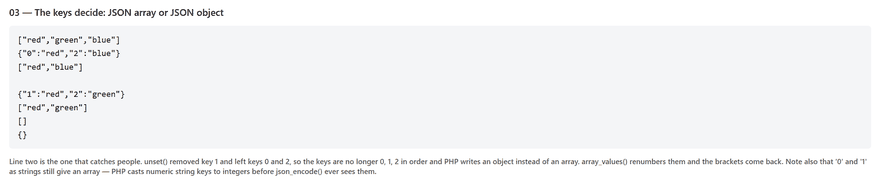
unset() does not renumber. The keys left behind are 0 and 2, which is not 0, 1, 2, so PHP wrote {"0":"red","2":"blue"} and the JavaScript at the other end got an object where it expected a list. array_filter() leaves the same gaps. The fix costs nothing: run array_values() over anything you have filtered or deleted from, immediately before encoding.
Two smaller edges show in that output. Numeric string keys such as '0' still give an array, because PHP casts them to integers before json_encode() sees them. And an empty array always encodes as [], never {} — pass JSON_FORCE_OBJECT if a client insists otherwise. This one rule explains most PHP JSON bug reports that begin "my array turned into an object".
Flags that make PHP JSON readable
The second argument to json_encode() is a bitmask, so flags combine with |. Three of them earn their place the first day you have to read your own output.
<?php
$page = [
    'title' => 'Café life',
    'url'   => 'https://theflowsyntax.com/web-development/php-json',
    'tags'  => ['json', 'apis'],
];

echo json_encode($page) . "\n\n";

echo json_encode($page, JSON_PRETTY_PRINT | JSON_UNESCAPED_SLASHES | JSON_UNESCAPED_UNICODE) . "\n";
Output:
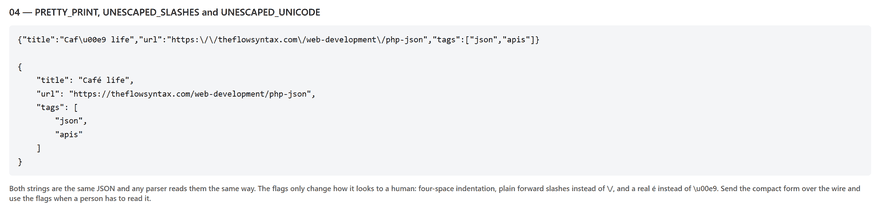
JSON_PRETTY_PRINT indents with four spaces and adds a space after each colon. JSON_UNESCAPED_SLASHES stops every / becoming \/, which is legal but turns a readable URL into a thicket. JSON_UNESCAPED_UNICODE writes é rather than \u00e9. None of them changes the meaning, so pretty printing belongs in logs and debug pages and the compact form goes over the wire.
json_decode() and the second argument
The other half of PHP JSON work runs backwards, and it has a default that catches everybody once. Give json_decode() a JSON object and it returns a stdClass object, not an array. Pass true as the second argument and you get an associative array instead.
<?php
$json = '{"name":"Wireless mouse","price":24.99,"stock":12}';

$object = json_decode($json);
echo gettype($object) . ' of class ' . get_class($object) . "\n";
echo $object->name . "\n\n";

$array = json_decode($json, true);
echo gettype($array) . "\n";
echo $array['name'] . "\n\n";

print_r($array);
Output:
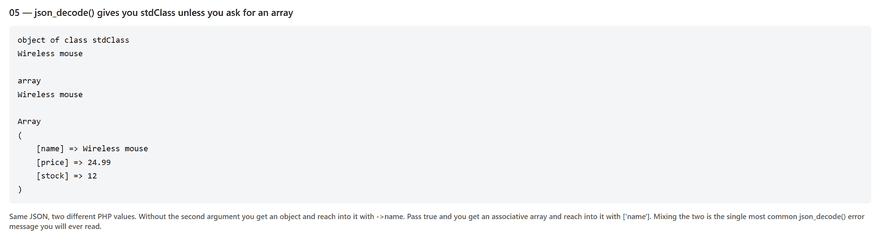
Same data twice; only the way in changes. $object->name for the first, $array['name'] for the second. Cross them and you get Error: Cannot use object of type stdClass as array, which is fatal rather than a warning. Most people pass true, because an array works with isset(), foreach and every array function you already know.
Decoding a nested payload
Real PHP JSON payloads are nested. An order carries a customer inside it and a list of items beside that. Decoded with true, the whole thing is arrays inside arrays, walked with the syntax you already use.
<?php
$json = '{
    "order": 8412,
    "customer": {"name": "Flow", "email": "flow@example.com"},
    "items": [
        {"sku": "MSE-01", "qty": 1, "price": 24.99},
        {"sku": "KBD-07", "qty": 2, "price": 39.50}
    ]
}';

$data = json_decode($json, true);

echo 'Order:    ' . $data['order'] . "\n";
echo 'Customer: ' . $data['customer']['name'] . "\n";
echo 'First sku: ' . $data['items'][0]['sku'] . "\n\n";

$total = 0;
foreach ($data['items'] as $item) {
    $line = $item['qty'] * $item['price'];
    $total += $line;
    echo $item['qty'] . ' x ' . $item['sku'] . ' = ' . number_format($line, 2) . "\n";
}

echo 'Order total: ' . number_format($total, 2) . "\n";
Output:

$data['items'][0]['sku'] reaches through a JSON array inside a JSON object, and PHP does not care how deep it goes. Drop the true and the same walk reads $data->items[0]->sku: objects for the JSON objects, real PHP arrays for the JSON arrays, mixed in one expression. That mixture is the strongest practical argument for passing true.
When PHP JSON will not decode
Feed json_decode() something that is not JSON and it returns null. No exception, no warning, no notice. The script carries on holding null where a payload should be and falls over several functions later, on a line that has nothing wrong with it.
json_last_error_msg() says what happened, but only if you ask, and only straight after the call.
<?php
$broken = "{'name': 'Flow'}";   // single quotes are not JSON

$data = json_decode($broken);
var_dump($data);
echo json_last_error() . ' ' . json_last_error_msg() . "\n\n";

// null on its own is valid JSON, so null is not proof of failure
var_dump(json_decode('null'));
echo json_last_error() . ' ' . json_last_error_msg() . "\n\n";

// PHP 7.3 and newer: make it throw instead of returning null
try {
    json_decode($broken, true, 512, JSON_THROW_ON_ERROR);
} catch (JsonException $e) {
    echo 'JsonException: ' . $e->getMessage() . "\n";
}
Output:

Look at the two NULL lines. The first is a failure and reports error 4, JSON_ERROR_SYNTAX. The second is a success and reports 0, because null is a valid JSON document. So if ($data === null) is not a failure test; only json_last_error() !== JSON_ERROR_NONE is.
PHP 7.3 added the better answer. Pass JSON_THROW_ON_ERROR and bad input throws a JsonException instead of returning null — the fourth argument on json_decode(), the second on json_encode(). An exception cannot be ignored by accident, so on 7.3 or newer it replaces the error-code dance entirely.
PHP JSON over HTTP: read a body, send a response
A JSON request does not arrive in $_POST. PHP fills that array from form encodings only, so an application/json body is invisible to it. Read the raw body yourself with file_get_contents('php://input'), and send Content-Type before the first byte of output, because it is a header.
<?php
header('Content-Type: application/json; charset=utf-8');

$body = file_get_contents('php://input');

try {
    $data = json_decode($body, true, 512, JSON_THROW_ON_ERROR);
} catch (JsonException $e) {
    http_response_code(400);
    echo json_encode(['ok' => false, 'error' => $e->getMessage()]);
    exit;
}

echo json_encode([
    'ok'       => true,
    'greeting' => 'Hello, ' . ($data['name'] ?? 'stranger'),
    'items'    => count($data['items'] ?? []),
], JSON_PRETTY_PRINT | JSON_UNESCAPED_SLASHES);
Output:
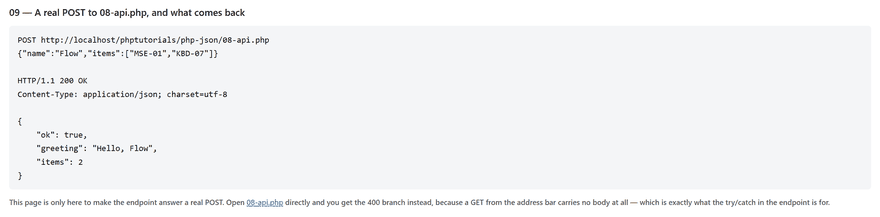
That is a whole endpoint. The try block turns a bad body into a 400 that is still JSON, so the caller never has to read an HTML error page to find out what broke. Open the file from the address bar and you land in that branch every time, because a GET carries no body — the output above is the same file answering a real POST.
Three mistakes with PHP JSON
Not checking whether the decode worked. json_decode() returns null for anything it cannot parse, and that null then travels. $data['user'] on it warns and yields another null, a foreach over it warns again, and the error you finally see names a line that is perfectly correct — while the real cause was an HTML maintenance page arriving where JSON was expected. Check json_last_error(), or pass JSON_THROW_ON_ERROR and let it stop there.
Forgetting that json_decode() gives you stdClass. Without the second argument the result is an object, so $data['key'] raises Error: Cannot use object of type stdClass as array and the request dies. It is a one-word fix, json_decode($json, true), and the habit worth building is writing that true every time.
Encoding text that is not valid UTF-8. JSON is UTF-8 by definition. Pass json_encode() a Latin-1 string out of an old database and the entire call returns false — not a partial string, the whole thing — with json_last_error_msg() reporting "Malformed UTF-8 characters, possibly incorrectly encoded". Since echo on false prints nothing, the symptom is an empty response body. Convert with mb_convert_encoding($text, 'UTF-8', 'ISO-8859-1'), or fix the source encoding.
Common questions about PHP JSON
The JSON questions that come up most once a real API is on the other end.
Why does my PHP JSON decode return null?
Because the string was not valid JSON: single quotes instead of double, a trailing comma, a byte order mark at the front, or an HTML error page where you expected a payload. json_last_error_msg() names it. Remember that null is also a correct answer, since null is valid JSON, so test the error code rather than the return value.
What is the difference between json_decode($json) and json_decode($json, true)?
The first gives you stdClass objects, read with ->. The second gives you associative arrays, read with ['key']. Nothing else differs: same data, same nesting, same order.
How do I read a JSON POST body in PHP?
$data = json_decode(file_get_contents('php://input'), true); — $_POST stays empty for an application/json request because PHP only parses form encodings into it, which is why the array looks broken when the body was fine all along.
Should I use json_encode() or serialize() to store data?
serialize() keeps PHP types, classes and private properties, but only PHP can read the result. json_encode() drops the class and keeps public data, and everything can read it. If the data ever leaves your application, use JSON. And never call unserialize() on anything a user sent you.
What is next
JSON is how another program talks to your script. A person talks to it through a form, and that arrives in a completely different shape: $_POST, one flat string per field, no types and no nesting. PHP forms covers that side — GET against POST, validating what turns up, and redisplaying a half-filled form without opening a hole in the page.
Loading comments...