๐Ÿ“ Web Development

PHP Login System: Register, Log In and Protect Pages

Sep 5, 20265 min read3 viewsBy Flow

A PHP login system is where most of this series finally comes together โ€” a form collects details, a database stores them, a hash protects the password, and a session remembers who is logged in from one page to the next. This lesson builds a working one from scratch: registration, login, a page only members can reach, and a logout that actually logs people out. Four small files, and every decision in them explained.

The table it needs

Every PHP login system starts with somewhere to put people. Run this once in phpMyAdmin, in the same flow_demo database the MySQL lesson used:

CREATE TABLE IF NOT EXISTS users (
    id            INT AUTO_INCREMENT PRIMARY KEY,
    username      VARCHAR(50)  NOT NULL UNIQUE,
    email         VARCHAR(120) NOT NULL UNIQUE,
    password_hash VARCHAR(255) NOT NULL,
    created_at    DATETIME     NOT NULL DEFAULT CURRENT_TIMESTAMP
);

Three things there are deliberate. The column is called password_hash, not password โ€” the name is a reminder to everyone who reads it later. It is VARCHAR(255), because today's hash is 60 characters and tomorrow's will not be. And UNIQUE on username and email means the database refuses duplicates even if your PHP check somehow misses one.

Registration

The first half of a PHP login system is registration. The handler validates, checks nobody has that name already, hashes the password and inserts:

<?php
require "db.php";

if ($_SERVER["REQUEST_METHOD"] === "POST") {
    $username = trim($_POST["username"] ?? "");
    $email    = trim($_POST["email"] ?? "");
    $password = $_POST["password"] ?? "";

    if ($username === "") {
        $errors[] = "Username is required.";
    }
    if (!filter_var($email, FILTER_VALIDATE_EMAIL)) {
        $errors[] = "That email address does not look valid.";
    }
    if (strlen($password) < 8) {
        $errors[] = "Password must be at least 8 characters.";
    }

    if (!$errors) {
        $stmt = $pdo->prepare("SELECT id FROM users WHERE username = ? OR email = ?");
        $stmt->execute([$username, $email]);

        if ($stmt->fetch()) {
            $errors[] = "That username or email is already registered.";
        } else {
            $hash = password_hash($password, PASSWORD_DEFAULT);

            $stmt = $pdo->prepare(
                "INSERT INTO users (username, email, password_hash) VALUES (?, ?, ?)"
            );
            $stmt->execute([$username, $email, $hash]);

            $success = "Account created. You can log in now.";
        }
    }
}
?>

Output
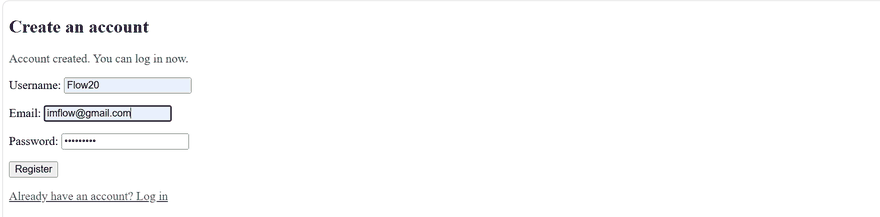
PHP login system registration form confirming a new account was created

Note what is not here. The password is never trimmed โ€” spaces are legitimate characters and trimming them silently changes what the user typed. It is never escaped or sanitised either, because it is going straight into password_hash() and coming out as safe hex. And the length check is on strlen() before hashing, not after: every hash is 60 characters regardless of the input.

filter_var() with FILTER_VALIDATE_EMAIL is worth knowing generally. It is a built-in validator that handles the awkward parts of the email format better than any regex you would write by hand.

What the database actually holds

Open the users table in phpMyAdmin after registering, because this row is the point of the whole exercise:

Output
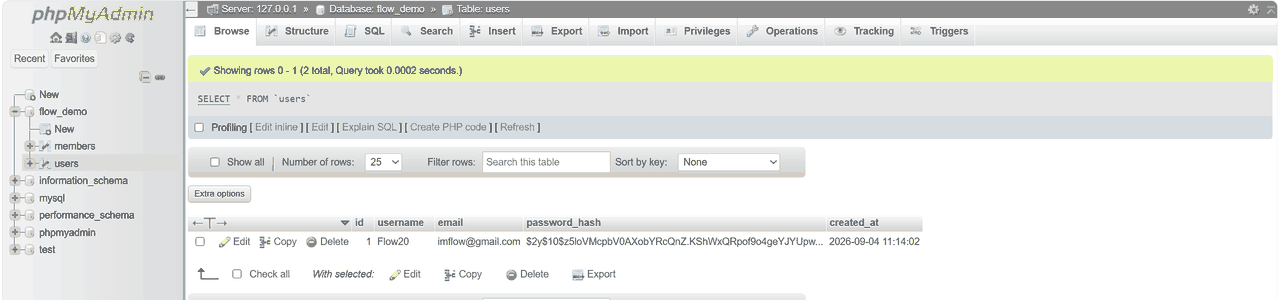
PHP login system users table in phpMyAdmin showing the bcrypt password hash

The password is not there. What is there is a 60-character string starting $2y$ โ€” the bcrypt marker, then the cost, then the salt and hash together.

If this database were stolen tomorrow, nobody's password would be in it. That is the entire reason we hash, and it is worth looking at once rather than taking on trust.

Logging in

The other half of the PHP login system is the mirror image: find the row, verify the password against the stored hash, and record the result in the session:

<?php
session_start();
require "db.php";

if ($_SERVER["REQUEST_METHOD"] === "POST") {
    $username = trim($_POST["username"] ?? "");
    $password = $_POST["password"] ?? "";

    $stmt = $pdo->prepare("SELECT id, username, password_hash FROM users WHERE username = ?");
    $stmt->execute([$username]);
    $user = $stmt->fetch();

    // One message for both cases. Never say which half was wrong.
    if (!$user || !password_verify($password, $user["password_hash"])) {
        $error = "Wrong username or password.";
    } else {
        session_regenerate_id(true);

        $_SESSION["user_id"]  = $user["id"];
        $_SESSION["username"] = $user["username"];

        header("Location: 03-dashboard.php");
        exit;
    }
}
?>

Output
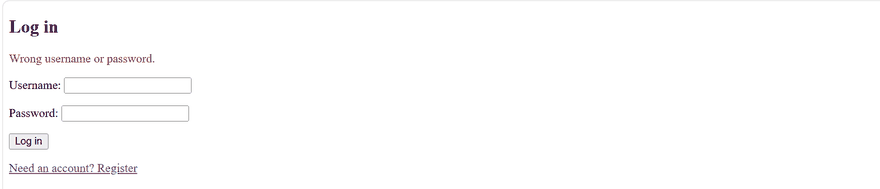
PHP login system output showing one generic wrong username or password message

Three lines here carry more weight than they look.

The single error message. "No such user" and "Wrong password" as separate messages hand an attacker a way to discover which usernames exist. One message for both keeps that shut.

session_regenerate_id(true). The visitor already had a session id before logging in, and if someone managed to plant a known id in their browser, that id would now be an authenticated session. Regenerating issues a fresh one at the moment privileges change, which makes the old one worthless. This is session fixation, and this one line is the whole defence.

exit after header(). A redirect header does not stop the script. Without exit, PHP keeps running and can leak the rest of the page into a response the browser is about to abandon.


Only the id and username go into the session. Never put the hash there, and never put a role you have not just read from the database.

The page only members can see

A PHP login system is only worth having if it actually keeps people out, and the guard that does it is not complicated. It is a check that runs before anything else on the page:

<?php
// auth.php
session_start();

if (empty($_SESSION["user_id"])) {
    header("Location: 02-login.php");
    exit;
}

Then every protected page starts with one line:

<?php require "auth.php"; ?>

<h2>Dashboard</h2>
<p>Logged in as <strong><?php echo htmlspecialchars($_SESSION["username"]); ?></strong>.</p>

Output

PHP login system dashboard showing the logged in username and user id

require rather than include, on purpose. If auth.php goes missing, an include would warn and then cheerfully render the protected page to anyone. require stops the script. This is exactly the distinction from PHP include and require, and here it is the difference between a guarded page and an open one.

The username is still escaped with htmlspecialchars() even though it came from your own database, because it originally came from a visitor. Data does not become safe by spending a night in MySQL.

Logging out properly

Logout is the step most PHP login system tutorials do in one line and get wrong. There are three separate things to clear:

<?php
session_start();

// 1. Empty the array.
$_SESSION = [];

// 2. Delete the cookie that points at the session file.
if (ini_get("session.use_cookies")) {
    $params = session_get_cookie_params();
    setcookie(session_name(), "", time() - 42000,
        $params["path"], $params["domain"], $params["secure"], $params["httponly"]);
}

// 3. Destroy the session data on the server.
session_destroy();

header("Location: 02-login.php");
exit;

Output

PHP login system redirecting a logged out visitor away from the dashboard

That screenshot is the test that matters: log out, then type the dashboard URL straight into the address bar. You land on the login form. If you see the dashboard, the guard is not doing its job.

session_destroy() alone leaves the session cookie sitting in the browser, and $_SESSION = [] alone leaves the file on the server. Doing all three is what makes logging out mean something on a shared computer.

Three mistakes with a PHP login system

Checking the password with ===. Two hashes of the same password are different strings, so a direct comparison always fails and the usual "fix" is to stop hashing. password_verify() is the only correct way to check.

Trusting a hidden field or a cookie for identity. $_COOKIE["user_id"] and <input type="hidden" name="is_admin"> are both edited in about four seconds. Identity lives in the session, on the server. The cookie only holds the session id.

Protecting the link instead of the page. Hiding the dashboard link from logged-out visitors is presentation, not security โ€” the URL still works. Every protected page needs the guard at the top, including the ones you assume nobody will find.

Common questions about a PHP login system

The questions that come up once accounts have real people behind them.

How do I add a "remember me" option?

Not by extending the session. A PHP login system handles this with a second, separate token. Generate a long random token, store a hash of it in a remember_tokens table next to the user id and an expiry, and send the raw token as a long-lived cookie. On a visit with no session, look the token up, log the user in, and issue a fresh one. Never put the user id or the password hash in that cookie.

Should I use email or username to log in?

Email is usually kinder โ€” people forget usernames and rarely forget their email. The code is identical; change the WHERE column. If you want to accept either, query with WHERE username = ? OR email = ? and pass the same input twice.

How do I stop someone guessing passwords?

Rate limit by account and by IP โ€” no PHP login system is complete without it. Count failures in a table, and after five in fifteen minutes start refusing or adding a delay. Hashing makes each guess slow for the attacker, but nothing stops an automated run except a limit on attempts.

Do I need to hash the password in JavaScript before sending it?

No, and it does not help. Whatever the browser sends becomes the effective password, so hashing client-side just renames the secret. Send the real password over HTTPS and hash it on the server, where you control the algorithm.

How do I add user roles like admin?

Add a role column, read it into the session at login alongside the id, and check it in the guard. The important part is that the check happens on the server on every request โ€” hiding an admin link in the template protects nothing.

What is next

Your PHP login system now has every piece a small dynamic site needs: forms, sessions, a database, safe queries and accounts. The natural next step is to use them on something real โ€” a set of records that visitors can create, read, update and delete.

That is CRUD, and it is the project this whole series has been building towards. Until then, PHP MySQL is worth another look, since every one of those four operations is a prepared statement.

Comments

Loading comments...

Link copied to clipboard