๐Ÿ“ Web Development

PHP MySQL: Connect, Query and Insert Safely

Aug 26, 20265 min read4 viewsBy Flow

PHP MySQL is where your data finally stops disappearing. Everything so far lived only while the script ran โ€” the moment it finished, the values were gone. A database keeps them.

What a database actually is

Think of a spreadsheet. Each sheet is a table. Each column is a field with a fixed type. Each row is one record โ€” one user, one product, one comment.

MySQL is the program that stores those tables and answers questions about them. PHP is what asks the questions. The language it asks in is SQL.

You already have MySQL if you installed XAMPP. Open http://localhost/phpmyadmin and you are looking at it.

Why not just save it to a file?

A fair question, and the honest answer is that for ten records you could. file_put_contents() works. The trouble starts the moment you need to find something.

Say you keep users in a file, one per line. To log somebody in you read the whole file and loop until the email matches. With fifty users that is instant. With fifty thousand it is fifty thousand comparisons on every single login.

Then it gets worse. Two people sign up in the same second, both read the file, both add their line, and one quietly overwrites the other. You want the ten highest scores, so you load everything into memory and sort it there. You want to change one field on one record, so you rewrite the entire file to do it.

A database is the program that has already solved all of that, and solved it properly. WHERE email = ? finds the row without reading the rest. Two writes at the same moment do not collide. Sorting and filtering happen before the data ever reaches PHP.

So what PHP MySQL actually buys you is not storage โ€” PHP can already write a file on its own. It is fast, safe answers to questions about your data, and that is the part you would otherwise have to build yourself, badly. Everything else in this PHP MySQL lesson is just learning how to ask.

Making a table to work with

In phpMyAdmin, create a database called flow_demo, then run this in the SQL tab.

CREATE TABLE students (
    id INT AUTO_INCREMENT PRIMARY KEY,
    name VARCHAR(100) NOT NULL,
    marks INT NOT NULL
);

INSERT INTO students (name, marks) VALUES
('Ali', 82),
('Sara', 91),
('Bilal', 68);

Output
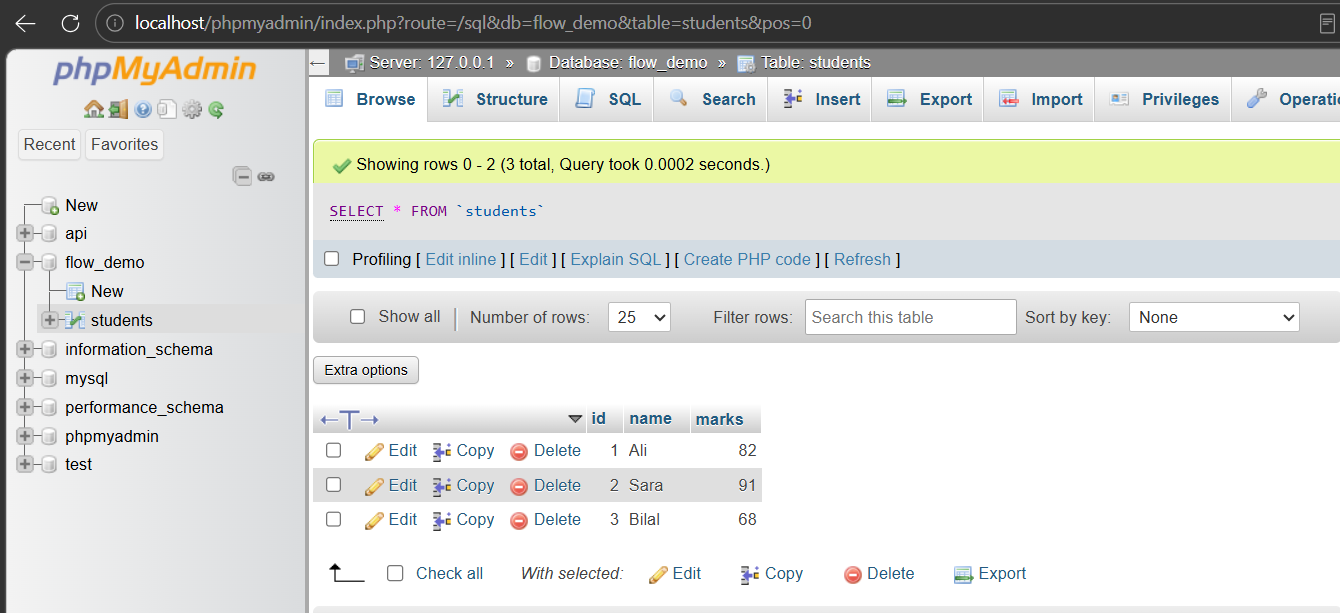
PHP MySQL setup: the students table in phpMyAdmin with three rows for Ali, Sara and Bilal

AUTO_INCREMENT PRIMARY KEY means MySQL hands out the id itself, and no two rows can share one. You will almost always want that on an id column.

Connecting PHP to MySQL

PHP has two ways to talk to MySQL. This lesson uses PDO, because the same code works with other databases and because it makes the safe way the easy way. The other extension, MySQLi, can be written as plain functions with no classes at all โ€” that version is PHP MySQLi: connect and query without PDO.

<?php
$host = "localhost";
$db   = "flow_demo";
$user = "root";
$pass = "";

try {
    $pdo = new PDO("mysql:host=$host;dbname=$db;charset=utf8mb4", $user, $pass);
    $pdo->setAttribute(PDO::ATTR_ERRMODE, PDO::ERRMODE_EXCEPTION);
    echo "Connected!";
} catch (PDOException $e) {
    echo "Connection failed: " . $e->getMessage();
}
?>

Output

PHP MySQL PDO connection output printing Connected after a successful database connection

On XAMPP the user is root and the password is empty. That is fine on your own machine and never fine on a real server.

The try and catch matter. ERRMODE_EXCEPTION tells PDO to throw a real error when something goes wrong instead of failing silently โ€” which is how people end up staring at a blank page for an hour.

Every example below carries on from this connection. If you put them in separate files, save the code above as db.php and start each one with require "db.php"; โ€” otherwise $pdo will not exist and PHP will say so.

Reading rows

<?php
$sql = "SELECT id, name, marks FROM students";

$rows = $pdo->query($sql)->fetchAll(PDO::FETCH_ASSOC);

foreach ($rows as $row) {
    echo $row["name"] . " scored " . $row["marks"] . "<br>";
}
?>

Output
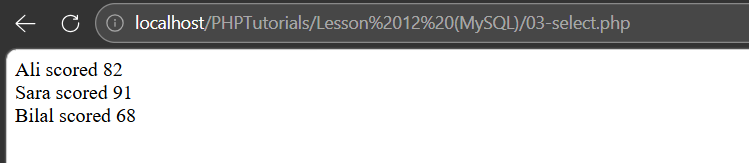
PHP MySQL select output listing each student and their marks from the database

Look at what came back: an array of associative arrays. Exactly the shape from PHP arrays, and you walk it with the same foreach.

That is the whole trick. A database result is just an array, and you already know arrays.

Inserting data safely

Here is the part that matters most in this lesson, so read it twice.

Never paste user input straight into SQL. Use a prepared statement: you write the query with placeholders, then hand the values over separately.

<?php
$name  = "Ayesha";
$marks = 88;

$stmt = $pdo->prepare(
    "INSERT INTO students (name, marks) VALUES (?, ?)"
);

$stmt->execute([$name, $marks]);

echo "Inserted row id " . $pdo->lastInsertId();
?>

Output

PHP MySQL prepared statement insert output showing the new row id returned by lastInsertId

The ? marks are placeholders. MySQL receives the query and the values as two separate things, so a value can never be read as a command.

Build the same query by gluing strings together and someone can type SQL into your form and run it. That is SQL injection, and prepared statements close it completely. There is no shortcut worth taking here.

Filtering with a placeholder

<?php
$minimum = 80;

$stmt = $pdo->prepare(
    "SELECT name, marks FROM students WHERE marks >= ? ORDER BY marks DESC"
);

$stmt->execute([$minimum]);

$rows = $stmt->fetchAll(PDO::FETCH_ASSOC);

foreach ($rows as $row) {
    echo $row["name"] . " โ€” " . $row["marks"] . "<br>";
}
?>

Output

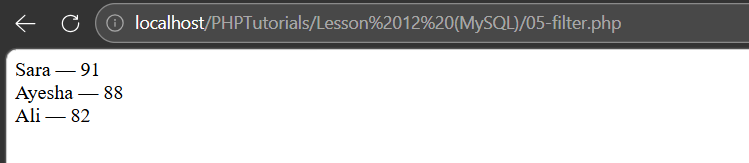
PHP MySQL filtered query output showing only students scoring 80 or above, highest first

Same placeholder rule applies to SELECT, not just INSERT. Any value that came from outside your code goes in as a parameter.

ORDER BY marks DESC sorts highest first. Let MySQL do the sorting โ€” it is far faster at it than PHP, and it saves you pulling rows you do not need.

Updating and deleting

<?php
$stmt = $pdo->prepare("UPDATE students SET marks = ? WHERE id = ?");
$stmt->execute([95, 2]);

echo "Rows updated: " . $stmt->rowCount() . "<br>";

$stmt = $pdo->prepare("DELETE FROM students WHERE id = ?");
$stmt->execute([3]);

echo "Rows deleted: " . $stmt->rowCount();
?>

Output

PHP MySQL update and delete output reporting one row updated and one row deleted

rowCount() tells you how many rows were actually affected. Zero usually means the WHERE matched nothing, not that the query failed.

And a warning worth taking seriously: leave off the WHERE and you change every row in the table. A DELETE FROM students with no condition empties it. Write the WHERE first, then the rest.

Three mistakes with PHP MySQL

Building queries with string concatenation. "SELECT * FROM users WHERE name = '" . $name . "'" is the classic SQL injection hole. Use placeholders every time.

Not turning on exceptions. Without ERRMODE_EXCEPTION, a failing query returns false and says nothing. You get a blank page and no idea why.

Forgetting the WHERE on UPDATE or DELETE. There is no undo. Test the condition with a SELECT first when you are unsure.

Common questions about PHP MySQL

The questions that come up most often the first time PHP and a database are introduced to each other.

Should I use PDO or MySQLi in PHP?

PDO, in most cases. It works with more than one database, its prepared statements are cleaner, and its named parameters are easier to read. MySQLi is fine and still supported, but PDO is the safer habit to build. If you need to read or write MySQLi, the full walkthrough is in PHP MySQLi.

How do I fix "Connection failed: Access denied for user root"?

On XAMPP the password is normally empty, so $pass = ""; is correct. Check the database name is spelled exactly as it appears in phpMyAdmin, and that MySQL is actually started in the XAMPP control panel.

What does PDO::FETCH_ASSOC do?

It returns each row as an associative array keyed by column name, so you write $row["name"]. Without it PDO also returns numbered keys, giving you every value twice.

How do I stop SQL injection in PHP?

Use prepared statements with placeholders and pass values through execute(). Never concatenate user input into the query string. Escaping functions are not a substitute โ€” placeholders are.

Why does my query return no rows when the data is there?

Usually a mismatch, not a bug: a different database selected, a typo in the column name, or a value that does not match exactly. Run the same SQL in phpMyAdmin to see whether the problem is the query or the PHP around it.

What is next

That is the full set. You can store values, make decisions, repeat work, group data, package logic, take input from a visitor, model things as objects, and now keep all of it in a database.

The obvious next build is a small CRUD app โ€” a form that adds records, a page that lists them, and links to edit and delete. It uses PHP forms and this lesson together, and it is the point where all of this starts to feel like a real application.

Comments

Loading comments...

Link copied to clipboard
