PHP MySQLi is the other way PHP talks to a database. The PHP MySQL lesson used PDO, which is built out of objects — new PDO, $pdo->prepare(). MySQLi can be written as plain functions instead: mysqli_connect(), mysqli_query(). No classes, no arrows, nothing you have not already met.
Why PHP has two database extensions
This confuses everybody at first, and the reason is history rather than design.
PHP once had a set of functions starting mysql_. They were everywhere, they had no protection against SQL injection worth the name, and they were removed in PHP 7. Two replacements arrived: MySQLi — the "i" is for improved — and PDO.
MySQLi talks to MySQL and nothing else. PDO talks to MySQL, PostgreSQL, SQLite and others through the same code. That difference is why most advice points at PDO.
So why learn PHP MySQLi at all? Two honest reasons. First, you will meet it — a huge amount of existing code and most beginner tutorials use it, and code you cannot read is code you cannot fix. Second, it can be written procedurally, so you can use a database before you have touched a single class.
Neither extension is deprecated. Both are fully supported. This is a choice, not a trap.
Connecting with mysqli_connect
Four arguments: host, username, password, database.
<?php
$conn = mysqli_connect("localhost", "root", "", "flow_demo");

echo "Connected!";
?>
Output

On XAMPP the user is root and the password is empty. Fine on your own machine, never on a real server.
Here is something most tutorials still get wrong. They tell you to write this:
<?php
// Old advice. On PHP 8.1 and up this check never runs.
if (!$conn) {
    die("Connection failed: " . mysqli_connect_error());
}
?>
Since PHP 8.1, MySQLi throws an exception when it fails instead of quietly returning false. The script stops before it ever reaches that if. The check is dead code.
If you want to handle a failed connection, catch it the same way you would with PDO:
<?php
try {
    $conn = mysqli_connect("localhost", "root", "", "flow_demo");
    echo "Connected!";
} catch (mysqli_sql_exception $e) {
    echo "Connection failed: " . $e->getMessage();
}
?>
This is genuinely an improvement. The old behaviour was a blank page and no clue why.
Reading rows
mysqli_query() runs the SQL. mysqli_fetch_assoc() pulls one row at a time as an associative array.
<?php
$conn = mysqli_connect("localhost", "root", "", "flow_demo");

$result = mysqli_query($conn, "SELECT id, name, marks FROM students");

while ($row = mysqli_fetch_assoc($result)) {
    echo $row["name"] . " scored " . $row["marks"] . "<br>";
}
?>
Output
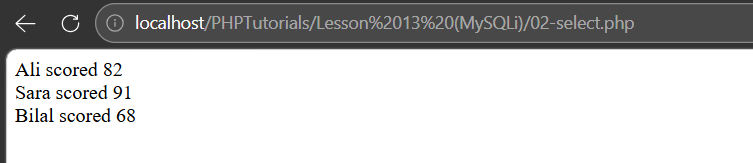
That while loop looks odd the first time. mysqli_fetch_assoc() hands back one row and moves on; when the rows run out it returns null, which ends the loop. The assignment inside the condition is doing two jobs at once.
Each $row is an associative array, exactly the shape from PHP arrays.
Inserting safely with a prepared statement
Same rule as always: never paste user input into SQL. Placeholders, then values, separately.
<?php
$conn = mysqli_connect("localhost", "root", "", "flow_demo");

$name  = "Ayesha";
$marks = 88;

$stmt = mysqli_prepare($conn, "INSERT INTO students (name, marks) VALUES (?, ?)");

mysqli_stmt_bind_param($stmt, "si", $name, $marks);
mysqli_stmt_execute($stmt);

echo "Inserted row id " . mysqli_insert_id($conn);
?>
Output

Look at "si". That is the part of PHP MySQLi people trip over. You have to tell it the type of every value, in order, as a string of letters:
| Letter | Means |
|---|
s | string |
i | integer |
d | double (a decimal) |
b | blob, sent in chunks |
"si" means "first value is a string, second is an integer". Get the count wrong and PHP throws an error. Get a letter wrong and the value can be mangled silently.
PDO needs none of this — you pass an array and it works it out. That single difference is most of the reason experienced developers prefer PDO.
Filtering with a placeholder
Reading with a placeholder needs one extra step: mysqli_stmt_get_result() turns the executed statement back into something you can fetch from.
<?php
$conn = mysqli_connect("localhost", "root", "", "flow_demo");

$minimum = 80;

$stmt = mysqli_prepare(
    $conn,
    "SELECT name, marks FROM students WHERE marks >= ? ORDER BY marks DESC"
);

mysqli_stmt_bind_param($stmt, "i", $minimum);
mysqli_stmt_execute($stmt);

$result = mysqli_stmt_get_result($stmt);

while ($row = mysqli_fetch_assoc($result)) {
    echo $row["name"] . " — " . $row["marks"] . "<br>";
}
?>
Output
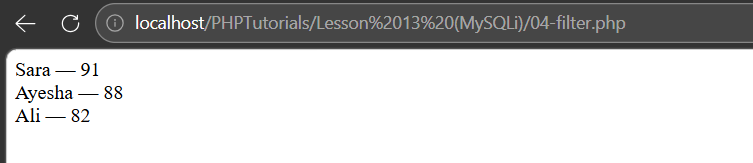
Bilal is missing because 68 is below the minimum, and the rest come back highest first. Let MySQL do the sorting — it is faster at it than PHP and you avoid pulling rows you do not want.
Updating and deleting
<?php
$conn = mysqli_connect("localhost", "root", "", "flow_demo");

$newMarks = 95;
$id       = 2;

$stmt = mysqli_prepare($conn, "UPDATE students SET marks = ? WHERE id = ?");
mysqli_stmt_bind_param($stmt, "ii", $newMarks, $id);
mysqli_stmt_execute($stmt);

echo "Rows updated: " . mysqli_stmt_affected_rows($stmt) . "<br>";

$deleteId = 3;

$stmt = mysqli_prepare($conn, "DELETE FROM students WHERE id = ?");
mysqli_stmt_bind_param($stmt, "i", $deleteId);
mysqli_stmt_execute($stmt);

echo "Rows deleted: " . mysqli_stmt_affected_rows($stmt);
?>
Output

mysqli_stmt_affected_rows() reports how many rows actually changed. Zero usually means the WHERE matched nothing, not that the query failed.
And the warning that never stops being true: leave off the WHERE and you change every row. There is no undo.
MySQLi has an object style too
Every function above has an object equivalent. Same extension, same behaviour, different spelling.
<?php
$conn = new mysqli("localhost", "root", "", "flow_demo");

$result = $conn->query("SELECT name, marks FROM students");

while ($row = $result->fetch_assoc()) {
    echo $row["name"] . " — " . $row["marks"] . "<br>";
}
?>
Output
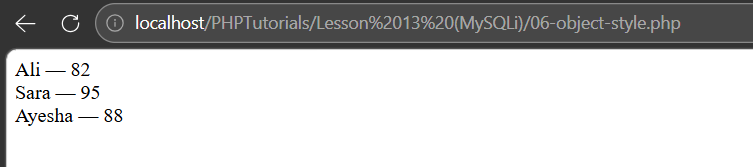
Sara is on 95 and Bilal is gone — that is the update and delete from the previous section, read back.
mysqli_query($conn, $sql) becomes $conn->query($sql). The connection stops being an argument and becomes the thing you call the method on. If PHP OOP has clicked, this reads better. If it has not, stay procedural — the two are equally capable.
PHP MySQLi against PDO
| MySQLi | PDO |
|---|
| Databases | MySQL only | MySQL, PostgreSQL, SQLite and more |
| Style | Procedural or object | Object only |
| Binding values | Type letters — "si" | Pass an array |
| Named placeholders | No | Yes — :name |
| Fetch all rows at once | Extra step | fetchAll() |
For a new project, PDO. For reading the code already in front of you, PHP MySQLi. Knowing both costs you one afternoon and saves you a lot of confusion.
Three mistakes with PHP MySQLi
Forgetting the connection argument. mysqli_query($sql) fails — procedural MySQLi needs the connection first: mysqli_query($conn, $sql). PDO does not, which is an easy habit to carry across wrongly.
Getting the type string wrong. "si" must match the number and order of your values. Three placeholders need three letters.
Trusting if (!$conn). On PHP 8.1 and up that never runs, because a failed connection throws. Use try and catch.
Common questions about PHP MySQLi
The questions that come up most when people meet the two extensions side by side.
Is MySQLi deprecated in PHP?
No. The old mysql_ functions were removed in PHP 7, and people often confuse the two. MySQLi is current and fully supported. PDO is usually recommended for new work, but that is a preference, not a deprecation.
What does "si" mean in mysqli_stmt_bind_param?
It is the type of each value in order: s string, i integer, d double, b blob. "si" means the first value is a string and the second an integer. The letters must match the number of placeholders.
Should I use PHP MySQLi procedural or object style?
Whichever you can read. They do exactly the same thing. Procedural is easier before you have learned classes; the object style fits better once you have.
Why is my mysqli connection error not showing?
Because since PHP 8.1 it throws instead of returning false, so if (!$conn) never fires. Wrap the connection in try and catch (mysqli_sql_exception $e) and read $e->getMessage().
Can I use MySQLi and PDO in the same project?
Technically yes — they are separate extensions and will not clash. In practice, pick one and stay with it. Two ways of doing the same thing in one codebase is a maintenance problem waiting to happen.
What is next
You can now reach a database two ways, and read almost any PHP database code you come across.
If you have not seen the PDO version, read PHP MySQL: connect, query and insert safely — the same five operations, written the other way. Comparing them side by side is the fastest way to make both stick.
Loading comments...